OpenCourant crash simulation: a 1.5-million-element Toyota Yaris at 56 km/h, from 8 to 192 cores on cloudHPC
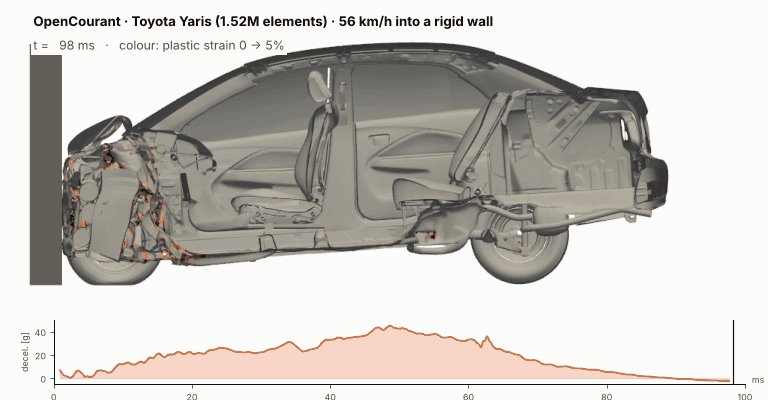
TL;DR. We ran the public CCSA/GMU 2010 Toyota Yaris finite element model (1,519,587 elements, LS-DYNA keyword format) in a US NCAP full-frontal impact at 56 km/h with OpenCourant, the community fork of OpenRadioss, on cloudHPC.
- The LS-DYNA deck runs in OpenCourant with two changes: one top-level
.keyfile and a*CONTROL_UNITScard for the spot welds.- Crash physics: peak deceleration 45 g at 49 ms, maximum crush 591 mm at 62 ms, rebound at about 10 km/h. About 150 kJ of kinetic energy goes into deformation.
- Scaling: the first 40 ms take 157 min on 8 cores and 8.4 min on 192 cores (speed-up 18.7, 78% efficiency). Efficiency stays at 85–95% up to 96 cores.
- Cost: the cheapest run is €3.50 on 32 highcore vCPU; the best value is highcore 64 (27 min, €4.05). Hyperthreaded instances are the slowest per euro.
If you need results fast, use hypercore 96–192. If you run many variants overnight, use highcore 64.

Why a full-vehicle crash test, and why now
In early October 2026 Siemens took down the OpenRadioss repository and redirected users to Simcenter Radioss. Within days, Brian Clemens, co-founder of Rocky Linux, launched OpenCourant, an AGPLv3 fork that keeps the full OpenRadioss history and already ships Linux and Windows packages [1, 2]. OpenCourant is available on cloudHPC as a ready-to-run solver.
A new fork raises two practical questions: does it still run real industrial models, and does it still scale? In May 2025 we measured OpenRadioss scalability on a 1-million-element Neon model [3]. This time we took a larger and more modern model: the 2010 Toyota Yaris from the Center for Collision Safety and Analysis (CCSA) at George Mason University, a model validated against NHTSA crash tests and distributed in LS-DYNA format [4, 5]. Running an LS-DYNA deck is the most common way engineers try an open crash solver, so it is also the most useful test.
Results at a glance
| Quantity | Value | Note |
|---|---|---|
| Model size | 1,519,587 elements · 1,488,581 nodes · 940 parts | CCSA detailed model v2j, 1,263 kg |
| Impact speed (from kinetic energy) | 55–56 km/h | US NCAP full frontal: 56 km/h (35 mph) |
| Peak vehicle deceleration | 45 g at 49 ms | from translational kinetic energy, 9-point smoothing |
| Maximum dynamic crush | 591 mm at 62 ms | vehicle stops, then rebounds |
| Rebound speed | ≈ 9.6 km/h | at 98 ms |
| Energy error | −3.6% at 40 ms · −5.9% at 98 ms | within the usual ±10% crash guideline |
| Added mass (mass scaling) | ≈ 15 kg (1.2%) | time step ≈ 1.0 µs |
| Fastest 40 ms run | 8.4 min · hypercore 192 | €13.55 |
| Best value 40 ms run | 27 min · highcore 64 | €4.05 |
The case: US NCAP full-frontal impact into a rigid wall

The CCSA Yaris is one of the most widely used public vehicle models. It was built by reverse engineering a 2010 Yaris sedan and validated against NHTSA full-frontal test 5677 (56.3 km/h, 1,271 kg test mass) and other configurations [4, 5]. The deck contains the body-in-white, powertrain, suspension, interior, spot welds, and piecewise-linear and Johnson–Cook materials with failure.
We used the full-frontal rigid-wall input distributed with the model and did not change the physics: same materials, contacts, spot welds, initial velocity and time-step control. The requested end time was 200 ms.
Running an LS-DYNA crash deck in OpenCourant
OpenCourant reads LS-DYNA keyword files directly. Two changes were needed for this model, and both came from the error messages:
- Only one
.keyfile at the top level. The CCSA deck is split into a main file and several include files. On cloudHPC the solver picks the input by extension, so we renamed the main file toYaris_OpenRadioss.keyand the includes to.inc(and updated the*INCLUDElines). Without this, the starter read an include file first and stopped with 16 undefined-node errors. - Add
*CONTROL_UNITS(mm s mtrc_ton). The model uses*MAT_SPOTWELDbeams. Without declared units, the starter stopped with 3,111 errors of type 200041 on the spot welds. With the card, all 940 parts initialised correctly.
Crash results
Deceleration pulse and crush

The pulse has the classic shape of a small-car frontal crash: a first plateau around 20 g while the bumper beam and crash boxes collapse (0–30 ms), a rise to 45 g at 49 ms when the engine block reaches the wall and loads the firewall, then a drop as the car stops at 62 ms after 591 mm of dynamic crush. The car then rebounds at about 10 km/h.
How we got the pulse. OpenCourant prints global energies in the engine listing. We derived the vehicle speed from the translational kinetic energy and total mass, after removing the residual kinetic energy of structural vibration (which otherwise shows up as a false spike at rebound). The result is a whole-vehicle pulse, not an accelerometer at the B-pillar, so peaks are smoother than in test data.
Energy balance

The initial kinetic energy is about 150 kJ. By 62 ms, about 135 kJ has gone into plastic deformation; the gap with the initial value is contact friction and hourglass energy plus the energy error. The global energy error is −3.6% at 40 ms and −5.9% at 98 ms, inside the ±10% range usually accepted for full-vehicle crash models. Mass scaling added about 15 kg (1.2% of the vehicle mass).
Where the run stopped, and why it does not matter here
The run was set to 200 ms but stopped at 98.2 ms (cycle 98,609) with the message NODAL VELOCITY IS TOO HIGH FOR INTERFACE 2. A few shell elements in the front-end had already failed (Johnson–Cook failure), and free nodes left behind in the main self-contact interface moved too fast for the contact search. By then the crash itself is over: the car has stopped, rebounded, and the energies are flat. For NCAP-type evaluations the pulse up to 100 ms covers the full event. To reach 200 ms you can delete those failed nodes from the contact (or enable element deletion cleanup in the interface) and restart from the last restart file.
Scalability: 8 to 192 cores
For the scaling series we ran the first 40 ms (40,171 cycles), which includes the main crush phase and all the contact activity, on regular (non-preemptible) instances so that timings are not disturbed. We measured the engine time from the OpenCourant listing. Three instance families were used:
- hypercore: newest AMD EPYC generation, physical cores only (8 to 192 vCPU);
- highcore: previous AMD EPYC generation, physical cores only, lower price (32 and 64 vCPU);
- hypercpu: newest generation with hyperthreading (32 vCPU = 16 physical cores).

| Instance | vCPU | Elements per core | Engine time | Speed-up | Efficiency | Cost (40 ms run) |
|---|---|---|---|---|---|---|
| hypercore | 8 | 189,948 | 156.7 min | 1.00 | 100% | €4.93 |
| hypercore | 16 | 94,974 | 84.8 min | 1.85 | 92% | €5.52 |
| hypercore | 32 | 47,487 | 46.3 min | 3.39 | 85% | €6.75 |
| hypercore | 48 | 31,658 | 30.9 min | 5.08 | 85% | €6.93 |
| hypercore | 96 | 15,829 | 13.8 min | 11.38 | 95% | €9.59 |
| hypercore | 192 | 7,914 | 8.4 min | 18.65 | 78% | €13.55 |
| highcore | 32 | 47,487 | 55.8 min | 2.81 | 70% | €3.50 |
| highcore | 64 | 23,743 | 27.1 min | 5.77 | 72% | €4.05 |
| hypercpu | 32 (16 cores) | 94,974 | 74.1 min | 2.11 | 53% | €8.17 |
Speed-up and efficiency are relative to 8 hypercore vCPU, so highcore and hypercpu efficiencies also include the CPU-generation difference. Costs are the billed cost of the full job: they include instance start-up, the OpenCourant starter (model reading and initialisation) and result upload, so short runs on many cores carry a larger fixed share. All runs reached the same energy error (−3.6%), so the domain decomposition does not change the result.
What we learned on scaling
- OpenCourant scales well up to about 8,000 elements per core. Efficiency stays at 85–95% from 16 to 96 cores and is still 78% at 192. The 96-core result (95%) is higher than at 48 cores, probably because each core’s share of the model fits better in cache, which offsets part of the extra communication.
- This is better than our 2025 Neon test. There, going from 32 to 96 cores gave only 1.24× on a 1 M element model, and we recommended 20,000–30,000 elements per core [3]. Here the same step gives 3.36×. The models, contact definitions and solver builds differ, so this is not a like-for-like comparison, but it shows that the larger and more detailed Yaris model keeps cores busy much longer.
- Physical cores win. hypercpu 32 (16 physical cores with hyperthreading) takes 74 min against 85 min on 16 hypercore physical cores: the extra threads give only 13% more speed for 48% more cost (€8.17 vs €5.52). It is the most expensive option per unit of work.
- The newest CPUs are about 20% faster per core (hypercore 32: 46 min vs highcore 32: 56 min), but highcore costs about half as much per vCPU-hour.
Run time against cost: which instance to choose

| Goal | Instance | 40 ms run | Full crash to 100 ms (engine time, estimated) |
|---|---|---|---|
| Fastest result | hypercore 192 | 8.4 min · €13.55 | ≈ 21 min |
| Fast and efficient | hypercore 96 | 13.8 min · €9.59 | 34 min (measured, 98 ms run €16.17) |
| Best value | highcore 64 | 27.1 min · €4.05 | ≈ 68 min |
| Lowest cost | highcore 32 | 55.8 min · €3.50 | ≈ 2.3 h |
The 100 ms estimates scale the 40 ms engine time by the number of cycles (the time step is constant at about 1 µs); the hypercore 96 value was measured. For a design loop with many variants, highcore 64 gives a full frontal crash in roughly an hour for a few euros. When a result is needed before a meeting, hypercore 96–192 gives it in 20–35 minutes.
How to run this model on cloudHPC
- Download the 2010 Toyota Yaris detailed model from the CCSA website [4].
- Keep one main file at the top level, named
*_OpenRadioss.key; rename the other files to.incand update the*INCLUDElines. - Add
*CONTROL_UNITSwithmm s mtrc_ton(needed for the spot welds). - Compress the folder (tar.gz), upload it to cloudHPC storage and select the OpenCourant solver.
- Choose a physical-core instance: hypercore 96 for speed or highcore 64 for value. Use a regular instance for runs longer than 2 hours.
- Read energies and errors in the engine listing (
*_0001.out). Animation files (.vtk) can be opened in ParaView; a full set of 21 frames is about 11 GB.
FAQ
Can OpenCourant run LS-DYNA keyword files?
Yes. OpenCourant inherits the LS-DYNA keyword reader of OpenRadioss. The full CCSA Yaris deck, with 940 parts, spot welds and failure models, ran after two changes: a single top-level .key file and a *CONTROL_UNITS card.
How many cores should I use for a 1.5 million element crash model?
On cloudHPC, OpenCourant kept 85–95% parallel efficiency up to 96 cores (about 16,000 elements per core) and 78% at 192 cores. For the best price-performance use 64 physical cores; for the shortest time use 96–192.
How long does a full-vehicle frontal crash take in OpenCourant?
The first 100 ms of the Toyota Yaris NCAP frontal crash (1.52 M elements) took 34 minutes of solver time on 96 hypercore vCPU, and about 8 minutes per 40 ms on 192 vCPU.
Is hyperthreading useful for explicit crash simulation?
Not much. On 32 hyperthreaded vCPU (16 physical cores) the run was only 13% faster than on 16 physical cores, and it was the most expensive option per unit of work. Use physical-core instances (highcore or hypercore).
What is the difference between OpenCourant and OpenRadioss?
OpenCourant is the community fork created in October 2026, after Siemens removed the OpenRadioss repository. It keeps the full OpenRadioss code history and the AGPLv3 licence, so models and input formats are the same.
References
- It’s FOSS, “Siemens Abruptly Takes Down OpenRadioss, But a Fork is Already Live”, 5 October 2026. itsfoss.com/news/siemens-openradioss-fork
- Phoronix, “OpenCourant: Rocky Linux Developers Create Community Fork Of OpenRadioss”. phoronix.com/news/OpenRadioss-OpenCourant; OpenCourant project: github.com/OpenCourant/OpenCourant
- cloudHPC, “Unlocking Extreme Performance: OpenRADIOSS Scalability on CloudHPC with AMD EPYC Processors”, 27 May 2025. cloudhpc.cloud
- Center for Collision Safety and Analysis (CCSA), George Mason University, “2010 Toyota Yaris Detailed Finite Element Model”. ccsa.gmu.edu/models/2010-toyota-yaris. DOI 10.13021/G8CC7G
- CCSA, “2010 Toyota Yaris Detailed Model – Validation Report v2” (comparison with NHTSA test 5677 and other configurations). PDF
- NHTSA Vehicle Crash Test Database, test 5677 (2010 Toyota Yaris, full frontal rigid barrier, 56 km/h). nhtsa.gov
- cloudHPC, “Unleashing the Power of OpenRadioss for High-Speed Simulations: Impact, Explosions, and Beyond!”, 11 February 2025. cloudhpc.cloud
CloudHPC is a HPC provider to run engineering simulations on the cloud. CloudHPC provides from 1 to 224 vCPUs for each process in several configuration of HPC infrastructure - both multi-thread and multi-core. Current software ranges includes several CAE, CFD, FEA, FEM software among which OpenFOAM, FDS, Blender and several others.
New users benefit of a FREE trial of 300 vCPU/Hours to be used on the platform in order to test the platform, all each features and verify if it is suitable for their needs


