Ennova


From CAD to a solver-ready OpenFOAM® case – in the cloud
Ennova is a pre- and post-processor built for OpenFOAM: it imports and repairs your CAD, generates high-quality meshes with real boundary layers, writes the OpenFOAM dictionaries for you and lets you explore the results. On cloudHPC it runs on the same virtual machines as your simulations, paid by the hour.
OpenFOAM is a great solver. Getting a good mesh into it is the hard part.
Most of the time in an OpenFOAM project goes into cleaning CAD, fighting with snappyHexMesh layers and editing dictionary files by hand. Ennova was designed to remove exactly these steps. It was founded in 2007 by Dr. Michael Hohmeyer, formerly of ICEM CFD and Ansys, and was written from scratch as a parallel, client/server application for large industrial assemblies.
Native CAD import – no translation, no lost geometry
Ennova reads CAD through HOOPS Exchange by Tech Soft 3D, so your models are opened in their native format instead of being converted to STL first.
- STEP (AP203/214/242), IGES, Parasolid, ACIS and JT
- CATIA V5/V6, Siemens NX, Creo, SolidWorks, Inventor, Solid Edge, Rhino and more
- STL, OBJ and Nastran files for scanned or tessellated geometry
- Dozens or hundreds of parts loaded and prepared at the same time

One-click CAD repair on a mesh topology layer
Manufacturing CAD is rarely watertight. Ennova builds an intermediate mesh topology on top of the original geometry and repairs that layer automatically: stitching, volume detection, imprinting of intersecting bodies, defeaturing and shared-face naming.
- The original CAD is never modified or refitted: mesh coordinates stay on the true geometry
- Cleanup is targeted at what the mesh needs, not at the whole model
- Large assemblies repaired in minutes, in parallel
- Manual tools are still there when you need full control

The right mesh for each problem
Instead of forcing one grid type on every case, Ennova combines several meshing strategies and produces solver-ready meshes with very little input. Its anisotropic, structured-like boundary layers are the type of meshes that used to require hours of manual blocking in ICEM-CFD HEXA.


OpenFOAM case setup without editing dictionaries
Ennova’s GUI writes the OpenFOAM case for you – boundary conditions, physics and solver settings – for both the Foundation (openfoam.org) and ESI-OpenCFD (openfoam.com) versions. Say goodbye to editing dictionary files by hand.
- Mesh and case exported in native OpenFOAM format
- Cases can be run locally, on a remote server or, on cloudHPC, straight on the platform’s solvers
- The OpenFOAM files remain plain text: you can still open, check and modify every dictionary

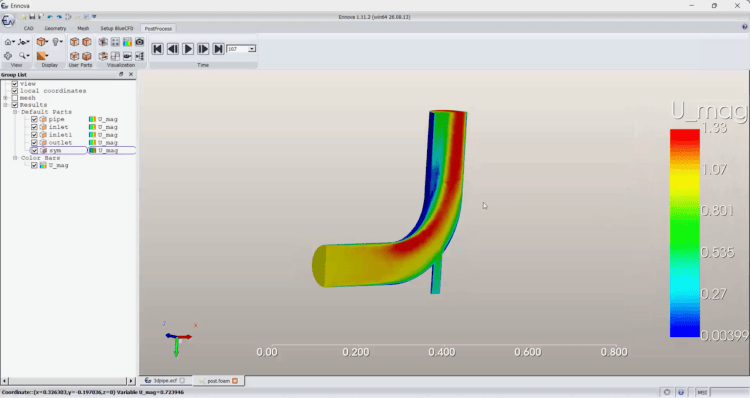
Post-processing built on VTK
The same visualization technology behind ParaView, integrated in the same interface you used to build the mesh.
- Slices, iso-surfaces, clips and thresholds
- Streamlines, surface streamlines and vector plots
- 2D graphs and animations of transient results

What changes in your OpenFOAM workflow
You keep OpenFOAM, its solvers and its zero licence cost for the CFD run. Ennova takes over the steps where most of the engineering hours are lost.
| Step | Typical OpenFOAM workflow | With Ennova on cloudHPC |
|---|---|---|
| Geometry | Export STL from CAD, fix gaps and overlaps in a third-party tool | Native CAD import of 39 formats and automatic repair on the mesh topology |
| Meshing | Write blockMeshDict and snappyHexMeshDict, iterate on refinement levels | Choose the mesher that fits the geometry and generate a solver-ready mesh from the GUI |
| Boundary layers | snappyHexMesh layer addition, often with patchy coverage on complex geometry | Dedicated prism mesher and anisotropic surface meshing for well-resolved near-wall cells |
| Case setup | Copy a tutorial and edit dictionaries by hand | Boundary conditions and settings defined in the GUI for openfoam.org or openfoam.com |
| Scale | Meshing large models limited by your workstation | Parallel meshing on cloud machines sized for the job – up to 224 vCPU and 8 GB of RAM per vCPU |
| Data transfer | Upload meshes of several GB to the cluster | Mesh, solve and post-process on the same cloud storage – nothing to move |
Better meshes, more reliable runs
Higher quality cells and properly resolved boundary layers help OpenFOAM converge and capture wall shear stress, heat transfer and separation.
Hours instead of days
Automatic CAD repair and GUI-driven setup cut the manual pre-processing time, especially on large assemblies with hundreds of parts.
No HPC licences
Ennova’s client/server, parallel architecture uses the same compute resources as the solver, and OpenFOAM runs on as many cores as you need with no per-core fees.
Ennova and OpenFOAM on the same machine
Ennova was designed with a lightweight desktop client and a compute server that runs where the processing power is. cloudHPC gives you exactly that: open Ennova on a cloud virtual desktop with the cores and RAM your model needs, and launch OpenFOAM on the same storage when the mesh is ready.
Ready to use
Ennova and the latest openfoam.org and openfoam.com releases are pre-installed. No installation, no licence server to configure.
Sized for each job
Pick the vCPU and memory for meshing, then a different machine for the solver. You pay only while the machine runs.
Expert support
The cloudHPC team has worked with OpenFOAM since version 1.5 and can help you set up and run your cases.
Your first Ennova project in six steps
- Register on cloudHPC and activate your account.
- Upload your CAD files (STEP, IGES, Parasolid, native CAD…) to your storage.
- Start a virtual desktop and open Ennova – your 5 free hours start here.
- Repair and mesh the geometry with the automatic tools.
- Set up the OpenFOAM case and launch it on the cloudHPC machine you choose.
- Post-process the results in Ennova or download them.
Try Ennova on your own geometry
Five free hours are enough to import, repair and mesh a real model.