OpenCourant cloud solver

Crash, impact and drop tests in the cloud with OpenCourant
OpenCourant is the open-source explicit finite element solver that carries on the OpenRadioss code. Upload your Radioss or LS-DYNA input deck, choose the number of cores and launch: cloudHPC runs the starter and the engine files in sequence and converts the animations for ParaView. You pay only while the machine runs.
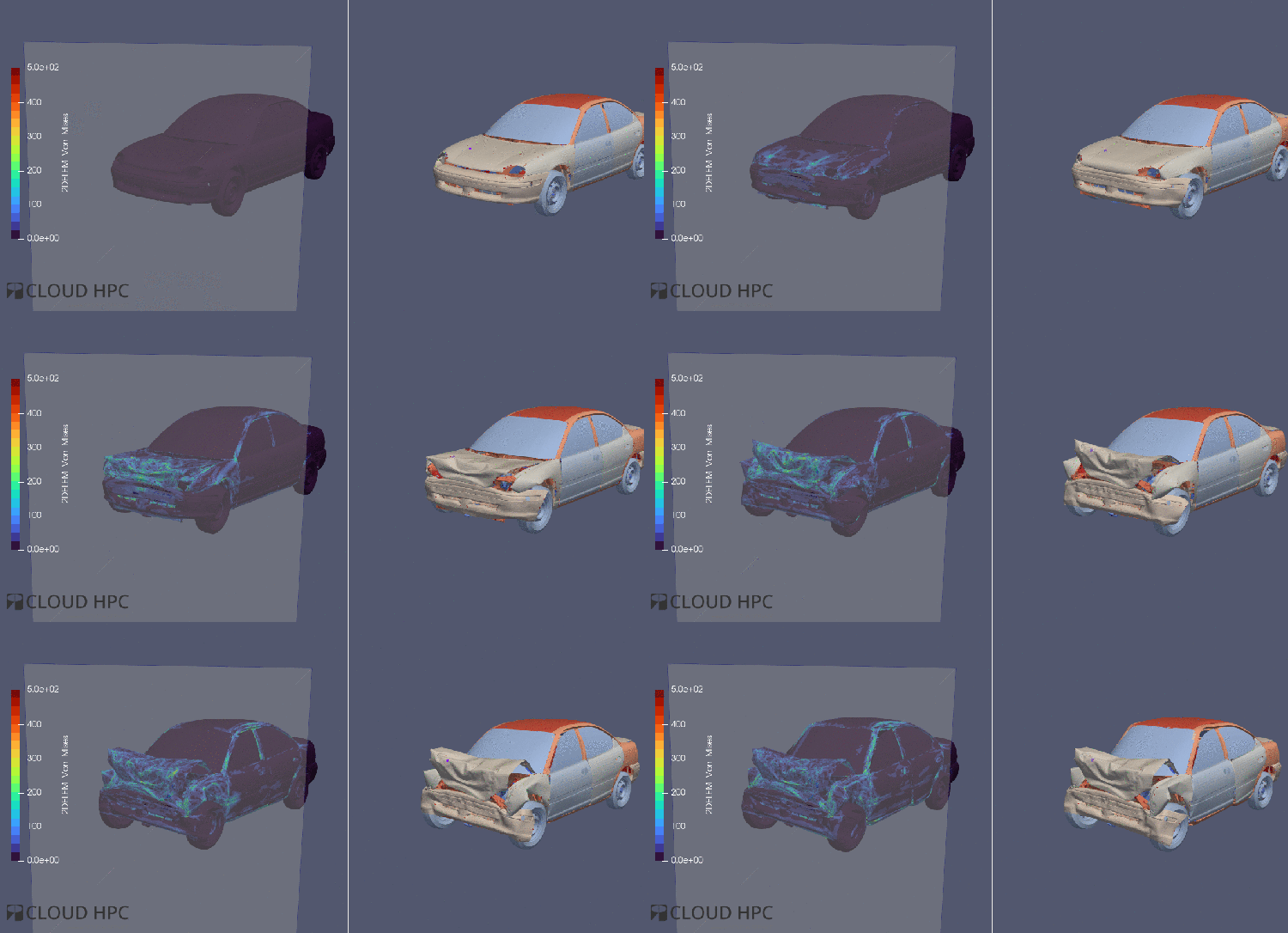
The open-source future of the OpenRadioss solver
OpenRadioss, the open-source release of the Radioss solver, was discontinued by its owner in October 2026. OpenCourant continues it from the last open-source code base, with the full commit history, as an incubator project of the Rocky Enterprise Software Foundation. Its name honours Richard Courant and the Courant–Friedrichs–Lewy condition behind every explicit solver. Your existing OpenRadioss models keep running, and cloudHPC had OpenCourant online within days of its first release.
Crashworthiness
- Full-vehicle and component crash
- Occupant safety and energy absorption
- Large models with millions of elements
Drop tests and impact
- Electronics, packaging and consumer products
- Damage, deformation and failure prediction
- Ballistic and high-velocity impact
Explicit time integration
- Highly non-linear, short-duration events
- Large deformations and rotations
- Robust for problems where implicit solvers struggle to converge
Materials
- Elasto-plastic, viscoelastic and hyperelastic laws
- Damage and failure models
- Strain-rate dependent behaviour under dynamic loads
Contact
- Self-contact and contact between parts
- Friction and separation
- Tied interfaces and rigid bodies
ALE and SPH
- Arbitrary Lagrangian–Eulerian and smoothed particle hydrodynamics
- Fluid–structure interaction with large deformations
- Water impact, sloshing and blast events
How an OpenCourant run works
What you upload
- Radioss format: the starter
*_0000.radand one or more engine files*_0001.rad,*_0002.rad… - LS-DYNA format: a
.keyinput deck - Include files and material data in the same folder
- Prepared in HyperMesh, ANSA or any tool that writes these formats
What cloudHPC does
- Runs the starter, then every engine file one after the other
- Uses MPI on every physical core and OpenMP on every hardware thread
- Converts the animation files to VTK at the end, ready for ParaView
- Keeps the starter and engine logs for each run
Control the run while it is going
- Send engine commands to a running job with a
.ctlfile /ANIMor/H3Dto write output now,/CHKPTto write a restart/STOPor/KILLto end the run cleanly or immediately
OpenRadioss models
- OpenRadioss is still available on cloudHPC, with the same set-up as OpenCourant
- Rerun older projects on the solver they were built with, or move them to OpenCourant with no changes
What changes compared with your workstation
| Step | On a workstation | On cloudHPC |
|---|---|---|
| Installation | Build the solver, MPI and the tools for each new release | OpenCourant and OpenRadioss pre-installed and maintained |
| Hardware | A full-vehicle crash keeps your PC busy for days | Up to 224 vCPU per run, only while it lasts |
| Load cases | Impact speeds and angles run one after another | Every load case on its own machine, at the same time |
| Optimisation | Few design iterations in the time available | Many variants in parallel, driven by the API |
| Post-processing | Download large animation files | ParaView on a remote desktop, on the same storage |
How many cores does my model need?
Rule of thumb
- Plan for about 20,000–30,000 elements per core
- Hyperthreaded machines are used in full: MPI on the cores, OpenMP on the threads
- hypercore gave the best cost/performance in our benchmarks
Good to know
- A
.ctlfile left in the folder stops the engine sequence: delete it before relaunching - Test the model on a short end time before the full run
- More details in the scalability guide
Explicit dynamics without the IT work
Expert support
Our engineers run structural and multiphysics simulations every day and can help you set up, size and debug your models.
Pay per use
No subscription and no licence: you pay per vCPU hour, only while the machine runs. Check the cost with the price calculator.
Automate with the API
Launch whole load-case matrices from your own scripts with the cloudHPC API. The platform is ISO 27001 certified.
Your first OpenCourant run in five steps
- Register on cloudHPC and activate your account.
- Prepare the Radioss or LS-DYNA deck in your pre-processor.
- Upload the input and include files to a storage folder.
- Choose the cores and launch OpenCourant.
- Post-process the VTK results in ParaView on a remote desktop, or download them.
Run your next crash or impact model in the cloud
Create your account and get 300 free vCPU hours to try OpenCourant on your own model.
OpenCourant is an incubator project of the Rocky Enterprise Software Foundation, released under the GNU AGPL v3. Radioss is a trademark of its respective owner. cloudHPC is not affiliated with or endorsed by the OpenCourant project, Siemens or Altair.