CF-MESH+ vs snappyHexMesh on the DrivAer: features, refinement, accuracy, mesh quality and meshing time
TL;DR
- Same 1:4 DrivAer STL (1.48 M triangles, from GrabCAD), same domain and same targets: 1.95 mm surface cells, 7.8/15.6 mm refinement boxes and 5 prism layers (first layer 0.376 mm, ratio 1.2).
- Meshing time: CF-MESH+ 5.7.0 took 765 s (12.7 min) on a cloudHPC remote desktop with 8 vCPU (4 cores + hyperthreading). snappyHexMesh v2606 took 1,198 s (20.0 min) on 8 physical cores. 65 % of the snappy time (778 s) went into layer addition. A second CF-MESH+ run gave the same mesh in 761 s.
- Mesh: CF-MESH+ produced 5.65 M cells, 94.7 % hexahedra. snappy produced 6.40 M cells, 88.0 % hexahedra. CF-MESH+ has lower average non-orthogonality (5.4° vs 8.8°) and lower maximum skewness (4.15 vs 6.84), but 12 faces above 70° non-orthogonality (snappy: max 65.0°, because it enforces
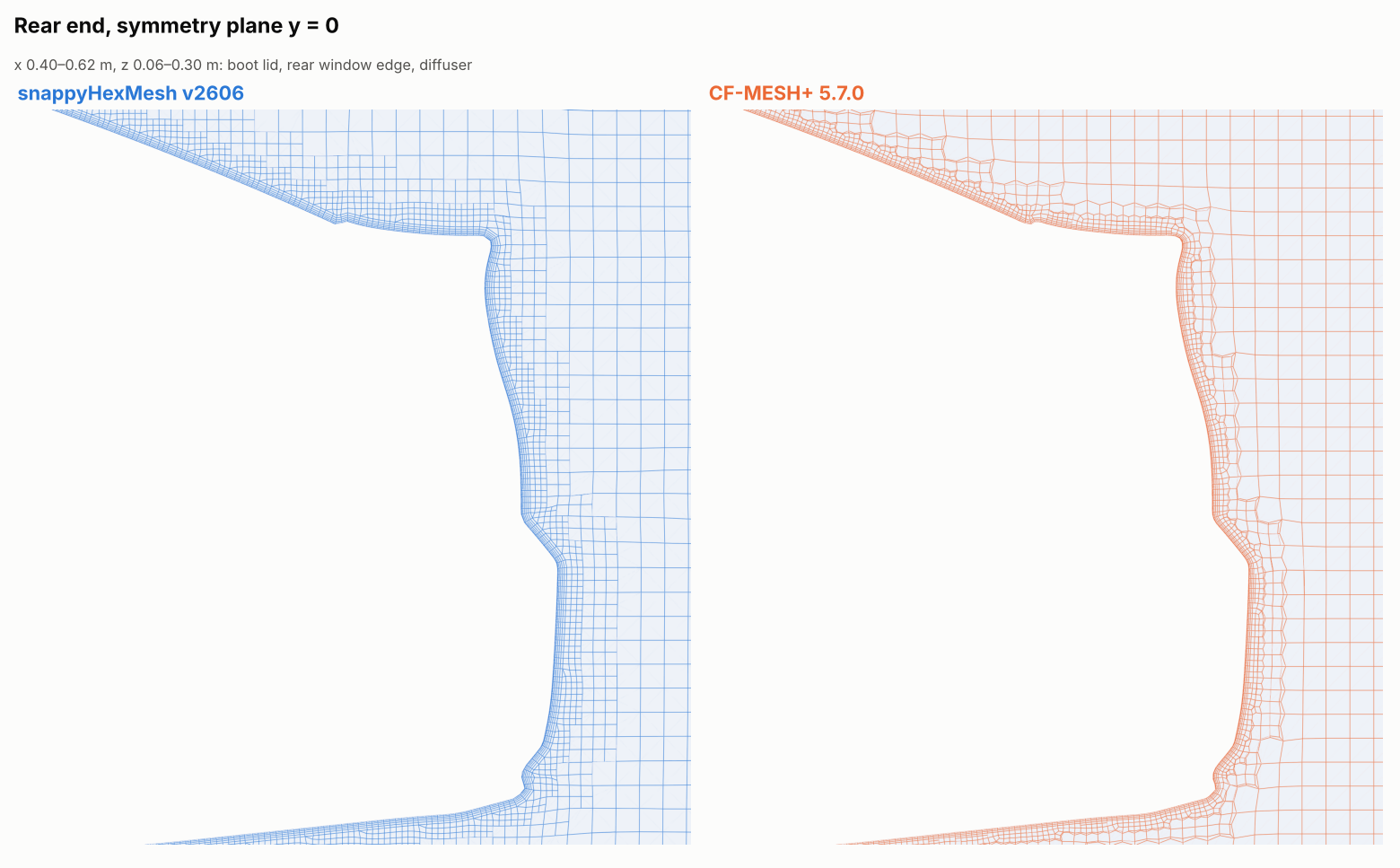
maxNonOrtho 65).- Layers: CF-MESH+ put near-wall layers on 99.98 % of the body and 98 % of the wheels, but only the first three layers follow the requested growth; layers 4–5 are stretched (median 0.93/1.35 mm instead of 0.65/0.78 mm). snappy grew the textbook 5-layer stack on 77 % of the body and collapsed or thinned it elsewhere, especially on the wheels (25 %).
- Geometric accuracy: 95 % of the body boundary sits within 0.032 mm (snappy) and 0.023 mm (CF-MESH+) of the CAD. On sharp edges, snappy (explicit feature snapping) is clearly better: median distance 0.001 mm vs 0.24 mm on the body. CF-MESH+ also closes the narrow tyre–ground wedge below about 7 mm height.

Why compare CF-MESH+ and snappyHexMesh now
snappyHexMesh is the mesher most OpenFOAM users start with. It is free, it runs in parallel with MPI and it is controlled from one dictionary. CF-MESH+ is the commercial, GUI-driven evolution of the open-source cfMesh library by Creative Fields: it writes native OpenFOAM meshes, is multi-threaded and is built around automatic boundary-layer generation. Both have been available on cloudHPC for years (cfMesh+ cloud now available on cloudHPC, snappyHexMesh on cloudHPC). Our 2023 overview of mesh generators compared them feature by feature, without numbers.
This post adds the numbers. We take a realistic external-aerodynamics geometry, give both meshers the same targets, and measure what came out: timing, cell types, checkMesh quality, prism-layer coverage, and how closely the mesh boundary follows the CAD.
Results at a glance
| Metric (1:4 DrivAer, same targets) | snappyHexMesh v2606 | CF-MESH+ 5.7.0 |
|---|---|---|
| Wall-clock meshing time | 1,198 s (20.0 min) on 8 cores | 765 s (12.7 min) on 4 cores + HT; repeat run 761 s |
| Cells | 6,396,795 | 5,651,188 |
| Hexahedra / polyhedra / prisms | 88.0 % / 10.8 % / 1.2 % | 94.7 % / 5.2 % / 0.1 % |
| Non-orthogonality max / face average | 65.0° / 8.8° | 73.1° (12 faces > 70°) / 5.4° |
| Max skewness (faces > 4) | 6.84 (312) | 4.15 (1) |
| checkMesh v2606 failed checks | 4 | 5 |
| Body area with a first cell ≤ 0.6 mm (layers present) | 95.1 % | 99.98 % |
| Body wall faces with all 5 layers on target (±10 %) | 77 % | 2 % (first 3 layers on target: 93 %) |
| Body surface deviation from CAD, p95 | 0.032 mm | 0.023 mm |
| Distance from sharp CAD edges, median (body / wheels) | 0.001 / 0.052 mm | 0.243 / 0.233 mm |
| Wheel surface area vs CAD | −0.75 % | −3.0 % (tyre–ground wedge filled) |
How the runs were set up

Geometry. We used the GrabCAD “drivaer car” model (uploaded by garcfd). It is one configuration of the TUM DrivAer fastback, delivered as a single STL. It is a 1:4 scale model: length 1.153 m, width 0.455 m, height 0.355 m, 1,478,532 triangles. The STL is watertight and holds five closed bodies (the car body and four wheels, which do not touch the body). We only rotated it to z-up; the triangles were not modified. To avoid zero-thickness cells where the tyres touch the road, the ground plane sits at z = 2 mm, so each wheel is cut by the ground (a small contact patch). The DrivAer was published by Heft, Indinger and Adams (2012) and is the reference generic car for automotive CFD.
Domain. The box runs from x = −2.5 to 6.0 m, y = ±1.5 m and z = 0.002 to 1.5 m, with the flow along +x. snappyHexMesh gets the box from blockMesh and the car STL. CF-MESH+ needs one closed surface around the fluid, so we built “box minus car” with a Boolean operation (manifold3d) and kept the patch names (inlet, outlet, ground, top, sides, body, wheels) as named STL solids. Both meshes have the same seven patches. The reference fluid volume is 38.0956 m³: snappy matches it (38.0956 m³), CF-MESH+ is 0.075 % smaller (38.0670 m³, see below).
Same targets for both meshers.
| Item | snappyHexMesh v2606 | CF-MESH+ 5.7.0 |
|---|---|---|
| Base cell | blockMesh 62.5 mm (136 × 48 × 24) | maxCellSize 0.0625 |
| Wake box (x −1.0…2.8, y ±0.55, z 0…0.65 m) | level 2 (15.6 mm) | additionalRefinementLevels 2 |
| Near box (x −0.75…1.40, y ±0.35, z 0…0.45 m) | level 3 (7.8 mm) | additionalRefinementLevels 3 |
| Body and wheels surface | level (5 5) → 1.95 mm | localRefinement 5 levels → 1.95 mm |
| Sharp edges | surfaceFeatureExtract (included angle 150°, 30,205 edges), feature level 6 (0.98 mm), explicit feature snapping |
feature edges detected at surface import (30°, 20,067 edges); no extra edge refinement |
| Prism layers on body + wheels | 5 layers, expansionRatio 1.2, finalLayerThickness 0.4 (relative) → first layer 0.376 mm |
5 layers, thicknessRatio 1.2, firstLayerThickness 0.000376 |
| Quality controls | default-style set, maxNonOrtho 65, nCellsBetweenLevels 3 |
defaults |
| Hardware | cloudHPC job, 8 vCPU highcore spot (AMD EPYC 7B13, 8 physical cores), 8 MPI ranks | cloudHPC remote desktop, 8 vCPU highmem (AMD EPYC 7B13, 4 cores + HT), 8 threads |
CF-MESH+ was driven entirely from its desktop GUI (Master settings → Refinement sources → Boundary layers → Run → Cartesian 3D) on a cloudHPC remote desktop. snappyHexMesh ran as a normal openFoam-v2606 batch job with an Allrun. The same OpenFOAM v2606 checkMesh -allGeometry -allTopology evaluated both meshes, so the quality numbers below are directly comparable.

Geometric accuracy was measured against the original STL with libigl point-to-surface distances (400,000 area-weighted samples per patch in each direction). Sharp edges were sampled every 0.2 mm along all reference edges with a dihedral angle above 30°. Layers were measured by walking from 20,000 random wall faces per patch into the mesh and recording the height of each cell. Scripts are in the downloadable case files.
Meshing time

| Stage | snappyHexMesh v2606 (8 MPI ranks) | CF-MESH+ 5.7.0 (8 threads) |
|---|---|---|
| Castellation / template | 163 s (4.25 M cells) | 765 s in one cartesianMesh call (repeat: 761 s, identical 5,651,188 cells) |
| Snapping | 198 s | |
| Layer addition | 778 s (+2.14 M cells) | |
| blockMesh, features, decompose, reconstruct, MPI start | 59 s | surface import a few seconds |
| Total | 1,198 s | 765 s |
What we learned. CF-MESH+ was 1.57× faster in wall-clock time while using half the physical cores (4 + hyperthreading vs 8 cores of the same AMD EPYC 7B13). The biggest single contributor is the layer step: snappy spends 65 % of its time adding layers (extrude, check quality, shrink, repeat: 41 layer-addition iterations here), while CF-MESH+ extrudes one layer and splits it. Other factors also differ, so do not read 1.57× as a pure algorithm ratio: snappy built 13 % more cells (level-6 feature band, nCellsBetweenLevels 3), ran on different hardware (MPI on physical cores vs threads with hyperthreading), and spent 59 s on blockMesh, decomposition and reconstruction. snappy, on the other hand, is MPI-parallel and can be spread across many cores or nodes. We ran CF-MESH+ multi-threaded on a single machine, which is how its desktop GUI is normally used.
Refinement and cell types

Both meshes are hex-dominant octree meshes, but they fill the space differently. Together with the different refinement and layer algorithms, the settings below explain why snappy ends up with 0.75 M more cells:
- snappyHexMesh keeps 3 cells between refinement levels (
nCellsBetweenLevels 3) and adds a level-6 band along every feature edge. This gives a thicker, more gradual transition. Its split-hex refinement leaves 692 k polyhedra (10.8 %) at the level interfaces. - CF-MESH+ grades faster away from the wall. Its level interfaces are cleaner (293 k polyhedra, 5.2 %) and 94.7 % of the cells are pure hexahedra.

Mesh quality (checkMesh)

| checkMesh v2606 (same command for both) | snappyHexMesh | CF-MESH+ |
|---|---|---|
| Max / average non-orthogonality | 65.0° / 8.83° | 73.1° / 5.40° |
| Faces > 70° non-orthogonality | 0 | 12 |
| Max skewness (faces > 4) | 6.84 (312) | 4.15 (1) |
| Max aspect ratio | 20.2 | 23.2 |
| Faces with low-quality tet decomposition | 1 | 786 |
| Cells with determinant < 0.001 | 123 | 0 |
| Concave cells (face planes) | 253,732 | 41,531 |
| Faces with interpolation weight < 0.05 / volume ratio < 0.01 | 0 / 0 | 4 / 2 |
| Failed checks | 4 | 5 |
What we learned. Neither mesh is “clean”, but neither has errors that usually block a steady RANS run (we did not run a solver in this post). The two meshers fail in different ways:
- snappy enforces its quality controls during meshing. It never goes above
maxNonOrtho 65, but it leaves a tail of highly skewed faces (312 faces above 4), plus a quarter of a million slightly concave cells. - CF-MESH+ produces a smoother bulk mesh: lower averages, and skewness above 4 on only 1 face. Its worst items are 12 faces above 70° non-orthogonality and 786 faces with poor tet decomposition. Its own checker (Check mesh in the GUI) reported “Number of errors: 0, Mesh status: OK”, with warnings for those faces.
Boundary layers


| Near-wall result | snappyHexMesh | CF-MESH+ |
|---|---|---|
| Median first-cell height (body / wheels) | 0.376 / 0.377 mm | 0.376 / 0.377 mm |
| Body area with first cell ≤ 0.6 mm | 95.1 % | 99.98 % |
| Wheel area with first cell ≤ 0.6 mm | 86.5 % | 98.1 % |
| Body faces: first 3 / all 5 layers on target (±10 %) | 78 % / 77 % | 93 % / 2 % |
| Wheel faces: first 3 / all 5 layers on target (±10 %) | 26 % / 25 % | 75 % / 0.5 % |
| Median layer heights on body [mm] (target 0.376 / 0.451 / 0.541 / 0.650 / 0.780) | 0.376 / 0.452 / 0.542 / 0.650 / 0.780 | 0.376 / 0.451 / 0.541 / 0.934 / 1.347 |
| Mesher’s own report | body 4.41 layers on average (90.9 % of target thickness); wheels 2.71 (58.9 %); 93.7 % of faces extruded | no per-patch layer summary in the log (coverage measured above) |
What we learned. This is the main difference between the two tools:
- snappyHexMesh builds the exact stack where its quality checks pass, and collapses or thins it elsewhere. Where it succeeds, the stack is perfect (median 0.376 → 0.780 mm, ratio 1.2). Around sharp edges, wheel arches and the tyres it collapses the stack: on the wheels only a quarter of the faces keep all five layers.
- CF-MESH+ almost never leaves the wall without layers (first cell ≤ 0.6 mm on 99.98 % of the body and 98.1 % of the wheels). It extrudes a single layer and refines it into five. The first three hit the target on 93 % of the body faces and 75 % of the wheel faces. The last two absorb the rest of the original layer thickness, so the stack is about 3.6 mm thick instead of 2.8 mm and the growth ratio jumps from 1.2 to 1.4–1.7 at layers 4–5.
If you need wall-resolved y⁺ ≈ 1 everywhere, CF-MESH+’s coverage is the safer bet. If you need a controlled growth rate through the whole stack, snappy delivers it where it succeeds, but you must check where it gave up.
Geometric accuracy and feature capture

| Mesh boundary vs original STL [mm] | snappy body | CF-MESH+ body | snappy wheels | CF-MESH+ wheels |
|---|---|---|---|---|
| Mesh → CAD distance, median / p95 / p99 | 0.0007 / 0.032 / 0.150 | 0.0058 / 0.023 / 0.151 | 0.011 / 0.091 / 0.235 | 0.009 / 0.191 / 0.472 |
| CAD → mesh distance, p99 / max | 0.160 / 1.36 | 0.169 / 1.40 | 0.290 / 2.99 | 3.85 / 14.5 |
| Sharp edges (> 30°): median / p95 | 0.001 / 0.097 | 0.243 / 0.579 | 0.052 / 0.348 | 0.233 / 0.917 |
| Surface area error | −0.12 % | −0.20 % | −0.75 % | −3.01 % |
What we learned.
- Smooth surfaces: both meshers are excellent. 95 % of the body boundary is within 0.032 mm (snappy) and 0.023 mm (CF-MESH+) of the CAD, under 2 % of the surface cell size.
- Sharp edges: snappy wins clearly. With an extracted
eMesh, level-6 feature refinement and explicit feature snapping, half of the body edge length is matched to within 0.001 mm. CF-MESH+ rounds edges slightly: median 0.24 mm, about one-eighth of the 1.95 mm surface cell. Its imported surface carried 20,067 feature edges (snappy’s two eMesh files: 30,205). The counts come from different tools and inputs, so they are not directly comparable. In the boot-lid close-up above the difference is visible: snappy keeps the corner sharp (and thins the layers there), while CF-MESH+ keeps the layers and gives the corner a small radius. - Tyre–ground contact: CF-MESH+ fills the thin wedge between tyre and road. 1.75 % of the wheel area, all at 2–7 mm height around the contact patches, is more than 1 mm from the mesh, and the ground patch rises to z = 5.6 mm there. snappy keeps the wedge open down to 2.4 mm. If the contact region matters (rotating wheels, brake cooling), add local refinement or a contact plinth in CF-MESH+.
- Far-field planes: CF-MESH+’s planar boundaries sit on average 0.3 mm inside the box (max 0.46 mm), so its fluid volume is 0.075 % smaller. This is irrelevant for the flow, but worth knowing if you compare volumes.
Features: what each mesher gives you
| Feature | snappyHexMesh (OpenFOAM v2606) | CF-MESH+ 5.7.0 |
|---|---|---|
| Licence | Open source (GPL), part of OpenFOAM | Commercial (Creative Fields), based on open-source cfMesh |
| Interface | Dictionary (snappyHexMeshDict) + command line |
Desktop GUI with 3D viewer; writes a standard meshDict; command-line tools included |
| Input | Closed or open STL/OBJ surfaces + a background blockMesh | One closed surface around the fluid (STL/FMS, CAD import in the GUI) |
| Parallelism | MPI, scales across nodes | Multi-threaded on one machine (as used here) |
| Refinement | Surface levels, regions (box, cylinder, distance), feature-edge levels, curvature-based options | Surface/patch levels or sizes, primitives (box, sphere, cone, annulus…), edges and points, automatic cell sizing |
| Prism layers | Iterative extrusion with quality-driven collapse; precise growth where it succeeds | Single extrusion split into N layers; full coverage, outer layers stretched |
| Quality control | Hard limits during meshing (meshQualityControls) |
Untangling and optimisation steps; separate Check mesh tool |
| Feature capture | Explicit/implicit feature snapping from .eMesh |
Feature edges from surface (angle-based) and patch boundaries |
| Typical use | Scripted, batch, very large meshes on many cores | Interactive set-up, robust layers, fast hex-dominant meshes on one workstation or cloud desktop |
Run times and costs
| Run | Machine (cloudHPC) | Meshing time | Billed cost |
|---|---|---|---|
| snappyHexMesh v2606, incl. checkMesh and surface export | 8 vCPU highcore, spot (job 94071) | 20.0 min | €0.215 for the whole 32-minute job (boot, meshing, analysis, upload) |
| CF-MESH+ 5.7.0, 2 meshing runs + Check mesh | 8 vCPU highmem remote desktop, spot (session 94065) | 12.7 min per run | billed per hour while the desktop is open (the two meshing runs used 2 × 12.7 min of it) |
| checkMesh v2606 + surface export of the CF-MESH+ mesh | 4 vCPU highcore, spot (job 94072) | – | €0.039 |
How to run these cases on cloudHPC
snappyHexMesh. Upload a case folder with constant/triSurface/{body,wheels}.stl, system/{blockMeshDict,surfaceFeatureExtractDict,snappyHexMeshDict,decomposeParDict,controlDict} and the Allrun from the case files, then launch openFoam-v2606 on highcore or hypercore. cloudHPC rewrites numberOfSubdomains to the physical cores, so you do not need to edit decomposeParDict. Our Allrun times every step and reconstructs the mesh. Tips:
- There is no
snappyHexMesh-v2606mesher entry: useopenFoam-v2606with anAllrun. ThesnappyHexMesh-v23xxentries work without anAllrun. - Layer addition dominates the run time. Tune
nLayerIter,featureAngleandmaxThicknessToMedialRatiobefore you add cores. - Spot instances are fine. The whole 32-minute job, including the 20-minute mesh, cost €0.215 on 8 vCPU.
CF-MESH+. Start a remote desktop with the CF-MESH+ app. Your cloudHPC storage is mounted as cloudHPC-storage on the desktop, so upload the surface there and import it from the GUI. Then work through Master settings → Refinement sources (Patches, Primitive objects) → Boundary layers (Patch-based settings) → Run → Cartesian 3D. Tips:
- CF-MESH+ needs one closed surface around the fluid. For external aero, build “box minus car” and keep the patch names as STL solids; the CF-MESH+ import keeps them.
- Choose “Thickness ratio | 1st layer thickness” in the layer settings to control the first cell height.
- Copy
constant/polyMeshback to the storage folder, then run your solver as a normal OpenFOAM job withmesh_folderor inside the case. - Stop the desktop when you are done: it is billed until it stops.
FAQ
Is CF-MESH+ faster than snappyHexMesh?
On this 1:4 DrivAer with the same targets, yes: 765 s vs 1,198 s, with half the physical cores. Most of snappy’s time (778 s) went into layer addition. snappy scales with MPI across nodes, so on many cores the gap can narrow (we did not measure this). We ran CF-MESH+ multi-threaded on one machine.
Which mesher gives better boundary layers?
It depends on what “better” means. CF-MESH+ covered 99.98 % of the body (98 % of the wheels) with near-wall layers, but only the first three follow the requested 1.2 growth. snappy produced the exact 5-layer stack on 77 % of the body and collapsed it near edges and on the wheels.
Which mesher captures sharp edges better?
snappyHexMesh with explicit feature snapping: the median distance from sharp CAD edges was 0.001 mm on the body, against 0.24 mm for CF-MESH+. On smooth surfaces both are within 0.032 mm (95th percentile).
Do I need a closed surface for CF-MESH+?
Yes. CF-MESH+/cfMesh meshes the inside of one closed surface, so for external aerodynamics you provide the domain box with the car subtracted. snappyHexMesh instead uses a background blockMesh plus the car surfaces.
Can I run both on cloudHPC?
Yes. snappyHexMesh runs as a batch job with any OpenFOAM version, and CF-MESH+ runs in a cloudHPC remote desktop. Both write standard OpenFOAM polyMesh folders, which any OpenFOAM solver job can use.
References
- Heft, A. I., Indinger, T., Adams, N. A. (2012). Introduction of a New Realistic Generic Car Model for Aerodynamic Investigations. SAE Technical Paper 2012-01-0168. doi:10.4271/2012-01-0168
- TUM Chair of Aerodynamics and Fluid Mechanics, DrivAer Model.
- GrabCAD Community Library, drivaer car (STL used in this post).
- Juretić, F. cfMesh User Guide v1.1, Creative Fields (PDF).
- Creative Fields, CF-MESH+.
- OpenCFD, snappyHexMesh documentation.
- Digital Engineering, Use of CF-MESH+ and OpenFOAM Helps Solve Turbulent Flow Simulation Around DrivAer Vehicle.
- CFD Online Wiki, DrivAer Model.
- cloudHPC blog: Master the Layers: Optimizing snappyHexMesh for High-Fidelity Boundary Layers, Comparing Mesh Generation Software, SnappyHexMesh Vs SALOME, cfMesh+ cloud now available on cloudHPC.
CloudHPC is a HPC provider to run engineering simulations on the cloud. CloudHPC provides from 1 to 224 vCPUs for each process in several configuration of HPC infrastructure - both multi-thread and multi-core. Current software ranges includes several CAE, CFD, FEA, FEM software among which OpenFOAM, FDS, Blender and several others.
New users benefit of a FREE trial of 300 vCPU/Hours to be used on the platform in order to test the platform, all each features and verify if it is suitable for their needs


