How to Compile and Execute Custom OpenFOAM Code on cloudHPC.cloud
One of the greatest strengths of OpenFOAM is its open architecture. Whether you are developing a novel turbulence model, crafting a tailored boundary condition, or building a brand-new solver from scratch, OpenFOAM gives you total freedom to extend C++ classes to fit your research or industrial needs.
However, moving custom C++ code from a local development machine to a cloud HPC environment often raises questions: How do I compile my custom libraries on the remote node? Do I need to set up complex environment variables or remote SSH build scripts?
At cloudHPC.cloud, we’ve made custom compilation completely zero-config. Our native execution scripts—covering both Foundation (openFoam-ofXX) and OpenCFD (openFoam-vXXXX) releases—automatically detect, compile, and link your custom libraries before launching your simulation.
Here is how to structure your case and leverage this automated compilation pipeline.
Folder Structure: How to Pack Your Custom Code
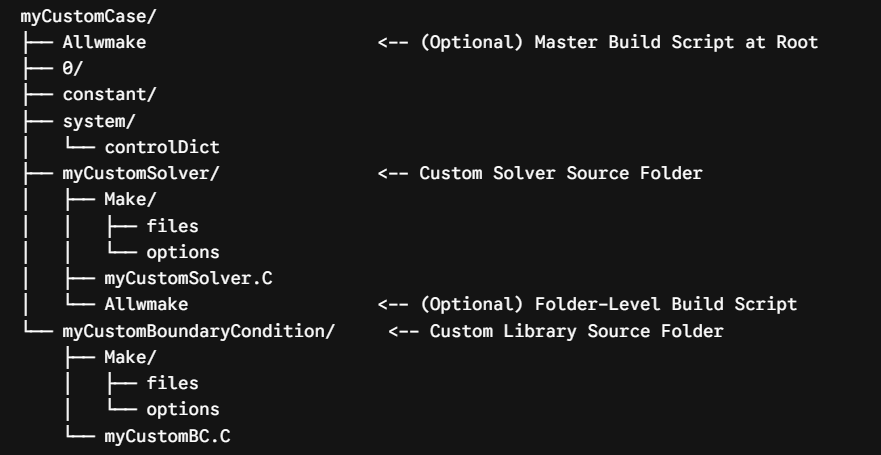
To run a case with custom code, simply place your custom C++ folders directly inside your root OpenFOAM case directory, alongside standard system folders like 0/, constant/, and system/. You can also include a root-level Allwmake script if you want to control the exact build order of multiple libraries.
Here is an overview of how your directory structure should look:
Plaintext
myCustomCase/
├── Allwmake                      <-- (Optional) Master Build Script at Root
├── 0/
├── constant/
├── system/
│   └── controlDict
├── myCustomSolver/               <-- Custom Solver Source Folder
│   ├── Make/
│   │   ├── files
│   │   └── options
│   ├── myCustomSolver.C
│   └── Allwmake                  <-- (Optional) Folder-Level Build Script
└── myCustomBoundaryCondition/     <-- Custom Library Source Folder
    ├── Make/
    │   ├── files
    │   └── options
    └── myCustomBC.C
Key Structure Rules:
- Root-Level
Allwmake(Highest Priority): If present directly inmyCustomCase/, the script executes this file first to handle top-level project compilation. - Place Subfolders at Root Level: Put your custom solver or library directories directly inside the main project directory.
- Standard OpenFOAM
Make/Directory: Ensure each custom subfolder includes a standardMake/directory containingfilesandoptions. FOAM_USER_APPBINorFOAM_USER_LIBBINOutput: Make sure yourMake/filestargets the user directory (e.g.,$FOAM_USER_APPBINfor applications or$FOAM_USER_LIBBINfor libraries) so the compiled binary lands in a location accessible by OpenFOAM.
How the Cloud Compiler Script Works Behind the Scenes
When you submit your case via the portal or the cloudHPCexec CLI, our automated script (foam-exec) initializes and scans your project workspace before running the solver.
Key Compilation Hierarchy: The script checks for a master
Allwmakefile at the root level first. If found, it executes it immediately. Afterwards, it iterates through all subdirectories (likemyCustomSolver/) to compile individual components using their localAllwmakeorwmakesetup.
Here is the updated step-by-step logic the system executes:
                  ┌───────────────────────────────┐
                  │ Upload Case & Launch Script   │
                  └───────────────┬───────────────┘
                                  │
                                  ▼
                    ┌───────────────────────────┐
                    │  Detect OpenFOAM Version  │
                    │   & Source Environment    │
                    └─────────────┬─────────────┘
                                  │
                                  ▼
                /───────────────────────────────────\
               / Is 'Allwmake' present at ROOT level \
               \__________________┬__________________/
                                 / \
                         YES    /   \    NO
                               /     \
                              ▼       ▼
       ┌─────────────────────────┐  ┌─────────────────────────────────┐
       │ Execute ./Allwmake      │  │ Iterate through Root Subfolders │
       │ Log: Allwmake.log       │  └────────────────┬────────────────┘
       └────────────┬────────────┘                   │
                    │                                │
                    └─────────────────┬──────────────┘
                                      │
                                      ▼
                 /─────────────────────────────────\
                / Does subfolder contain 'Allwmake'?\
                \_________________┬_________________/
                                 / \
                         YES    /   \    NO
                               /     \
                              ▼       ▼
       ┌─────────────────────────┐  ┌─────────────────────────────────┐
       │ Execute ./Allwmake      │  │ Does folder contain 'Make/'?    │
       │ Log: folder_comp.log    │  └────────────────┬────────────────┘
       └────────────┬────────────┘                   │
                    │                                ▼
                    │               /─────────────────────────────────\
                    │              / Is 'Make/' present in subfolder?  \
                    │              \_________________┬_________________/
                    │                               / \
                    │                       YES    /   \    NO
                    │                             /     \
                    │                            ▼       ▼
                    │             ┌───────────────────────────┐ ┌──────────────┐
                    │             │ Auto-patch FOAM_APPBIN    │ │ Skip folder  │
                    │             │ Execute 'wmake .'         │ └──────┬───────┘
                    │             │ Log: folder_comp.log      │        │
                    │             └──────────────┬────────────┘        │
                    │                            │                     │
                    └──────────────────┬─────────┴─────────────────────┘
                                       │
                                       ▼
                         ┌──────────────────────────┐
                         │ Execution Phase          │
                         │ Launch Main Solver       │
                         └──────────────────────────┘
The Automated Compilation Protocol:
- Environment Setup: The system sources the specific OpenFOAM environment (
bashrcandRunFunctions) for your chosen version. - Step 1 — Root-Level Check: The script checks if an
Allwmakefile exists directly inside the case root directory (myCustomCase/Allwmake). If found, it runs this master script first. - Step 2 — Subfolder Iteration: Next, the script loops over every sub-folder in your case root directory.
- Strategy A — Local
AllwmakeDetection: If a subfolder (e.g.,myCustomSolver/) contains anAllwmakescript, the runner makes it executable and runs./Allwmake, directing output to a dedicated log file (<folder>_compilation.log). - Strategy B — Automatic
wmakeFallback: If no localAllwmakefile exists in the subfolder, but aMake/directory is detected, the script automatically:- Safely patches references to default system bins to ensure binaries build inside the user sandbox (
FOAM_USER_APPBIN). - Runs
wmake .directly. - Outputs compilation warnings and errors to
<folder>_compilation.logfor easy debugging.
- Safely patches references to default system bins to ensure binaries build inside the user sandbox (
- Solver Execution: Once all custom components are successfully compiled and linked, the script moves on to parallel decomposition and launches your main simulation.
Pro-Tips for Smooth Custom Code Execution
- Include Custom Libraries in
controlDict: If you are compiling a custom boundary condition, function object, or thermophysical model, remember to list the resulting library in yoursystem/controlDictusing thelibskeyword:Plaintextlibs ( "libmyCustomBC.so" ); - Check Your Logs: If your solver fails to start due to a missing library or application error, check
Allwmake.logor<foldername>_compilation.login your case directory to inspect thegcc/wmakecompiler messages. - Avoid Pre-Compiled Binaries: Do not upload local
.soor binary files compiled on your workstation, as glibc or compiler version mismatches between Linux builds can cause segmentation faults. Let cloudHPC build fresh, natively optimized binaries on the execution node!
Ready to Run Your Custom OpenFOAM Solvers?
Whether you are sweeping parameters with standard solvers or compiling complex user extensions, cloudHPC.cloud provides the automated infrastructure you need to get fast, reliable results without managing hardware clusters.
🚀 Upload your case and custom code today at cloudhpc.cloud
#OpenFOAM #CFD #Simulation #HPC #CloudComputing #CPP #CustomCode #FluidDynamics #Automation
CloudHPC is a HPC provider to run engineering simulations on the cloud. CloudHPC provides from 1 to 224 vCPUs for each process in several configuration of HPC infrastructure - both multi-thread and multi-core. Current software ranges includes several CAE, CFD, FEA, FEM software among which OpenFOAM, FDS, Blender and several others.
New users benefit of a FREE trial of 300 vCPU/Hours to be used on the platform in order to test the platform, all each features and verify if it is suitable for their needs


