OpenLB on cloudHPC GPUs: simulating pollutant dispersion in a city district
OpenLB is an open-source lattice Boltzmann (LBM) framework written in C++. It is used for flows that are awkward for classical finite-volume codes: complex geometries, porous media, particle-laden and multiphysics problems. Because the lattice Boltzmann method is local and explicit, it maps very well to GPUs, and OpenLB has a CUDA backend.
cloudHPC now runs OpenLB on GPU machines. This post shows what that looks like in practice with a real example: the spread of PM2.5 pollution through a city district under measured wind conditions, using the urbanDigitalTwin3d case that ships with the OpenLB sources.

PM2.5 concentration 2 m above ground at the end of the run. Grey: buildings. The colour scale is in model units (see section 7).
1. How OpenLB runs on cloudHPC
OpenLB is not a program you feed an input file. A simulation is a small C++ program that includes the OpenLB library, and you compile it for your case. cloudHPC follows the same workflow as the OpenLB examples:
- You upload a case folder containing the
Makefileand the.cpp/.hfiles, plus any data files the program reads. - cloudHPC compiles it on the machine with
make. The variableOLB_ROOTin your Makefile is replaced automatically by the OpenLB installation on the machine, so you can keep the relative path you use locally. - cloudHPC runs the executable and streams its output to the simulation log.
- Results are archived in your storage folder when the run ends, like for any other solver.
For this case the Makefile is three lines:
EXAMPLE = urbanDigitalTwin
OLB_ROOT := ../../..
include $(OLB_ROOT)/default.mk
Three things are worth knowing:
- The folder must not contain executables at its root. No precompiled binaries and no shell scripts with the execute bit. The program is always built on the machine, against the installed OpenLB.
- It is a GPU build, one process, one GPU. The executable is started directly, without an MPI launcher. All the parallelism comes from CUDA on the GPU. More vCPU do not make the solver faster; choose the GPU machine type and keep the vCPU count small.
- The installation includes the PROJ library. The urban case needs it to convert map coordinates (OpenStreetMap latitude and longitude) to metres. OpenLB is compiled with this feature, so cases that depend on it work out of the box.
2. The case: LES of an urban district with a pollutant
The example is based on the work of the OpenLB group on urban digital twins (arXiv 2502.13746). It couples two lattices on the same grid:
- Flow: a D3Q19 lattice with a Smagorinsky large-eddy simulation (LES) model, driven by wind speed and direction read from a measured time series.
- Pollutant: a D3Q7 advection-diffusion lattice for PM2.5, advected by the LES velocity field.
The city geometry comes from an OpenStreetMap file. Buildings become solid cells. PM2.5 sources are placed on the streets (traffic) and the buildings, and their strength is scaled from air quality station measurements. Trees are modelled as porous media. Wind and station data are updated every 20 s of physical time, using one time stamp per interval.
We ran the small-district variant (map_small.osm):
| Domain | 255 m × 204 m × 42 m |
| Grid spacing | 1 m |
| Cells | 2.25 million |
| Time step | 2.2 ms |
| Steps | about 216,000 |
| Physical time | 480 s (24 wind/station time stamps) |
| Output | 28 VTK snapshots, every 17 s |
3. Preparing the folder
The VM that runs your case should not depend on downloading data at run time, so we put everything the program reads into the case folder. For this example:
urbanDigitalTwin.cpp
urbanDigitalTwin.xml
Makefile
map_small.osm
winddataReutlingen6_14.CSV
station_2024-11-06-2024-11-13_alteBurgStrasse.csv
station_2024-11-06-2024-11-13_lederStrasse.csv
The .cpp, .xml and Makefile come from examples/showCase/urbanDigitalTwin3d in the OpenLB sources. The map, wind and station files are the ones the example’s download_data.sh fetches from the OpenLB website. The download_data.sh script itself is not needed (and must not be executable).
Then in the cloudHPC interface:
- Upload the folder to your storage.
- Choose the solver OpenLB and a GPU machine type, with a small number of vCPU (we used 4).
- Launch. You can use a preemptible machine for a run like this one, as it is short.
You can do the same from an AI assistant through the cloudHPC connector. Everything above (upload, launch, monitoring the log, downloading results) is available there as tool calls.
4. What the log shows
Before the solver starts, the machine boots and the case is compiled with CUDA, which took about 12 minutes in this run. Then the program prints the unit converter, the grid and the first data it reads. During the run it prints a timer line every 1% of the steps:
[Timer] step=207000; percent=95.8333; passedTime=9120.45; remTime=396.541; MLUPs=51.0421
[LatticeStatistics] step=207000; physT=460; maxCFL=0.0293; avgEnergy=0.000159; avgRho=1.00041
MLUPs is millions of lattice updates per second, the standard LBM performance metric. The CFL number stayed around 0.03 and the density near 1 throughout, so the run was stable.
5. Results
Where does the pollution go?
At pedestrian height the plume stays attached to the street canyons and is swept around the building blocks in the direction of the wind. The animation shows all 28 saved snapshots, with no interpolation between them.

The second half of the run looks different from the first because the wind and station inputs change every 20 s:

The vertical picture
A vertical cut through the plume shows how the pollutant is lifted and mixed in the wake of the buildings, which a horizontal slice cannot show:

The flow behind it
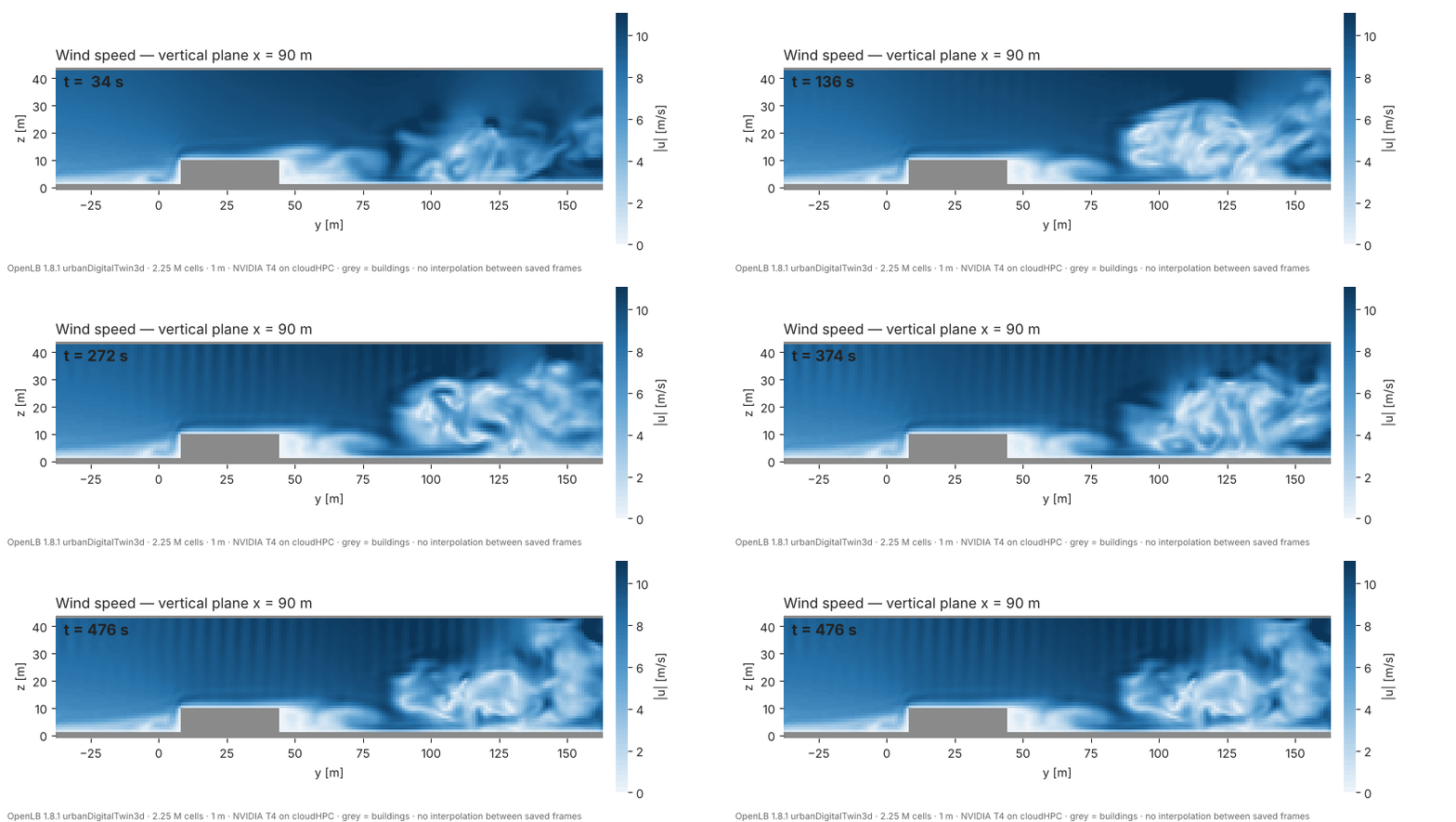
The wind field explains the pollutant pattern. Flow accelerates around the corners of the blocks, and a large recirculating wake forms behind them. This is what traps pollutant at street level:


6. Performance and cost
| Machine | cloudHPC GPU machine (NVIDIA T4), 4 vCPU, preemptible |
| Solver time (measured by OpenLB) | 9515 s, about 2 h 39 min |
| Average speed | 50.5 MLUPs |
| Real time per physical second | about 20 s |
| Total job cost, including build and upload | €3.55 |
For reference, the plain cavity3d benchmark that ships with OpenLB reached 636 MLUPs at 100³ and 1071 MLUPs at 300³ on the same GPU (single precision). The urban case is much slower per cell because each step updates two lattices, runs an LES model and handles porous and source terms. We did not profile it, so we cannot say which of these costs the most.
The numbers are for this one case on one GPU type. They are not a general scaling study.
7. What this does not show
- No validation. This is a demonstration that the case builds and runs on cloudHPC, and a look at the results. We have not compared the PM2.5 field with measurements. The example takes its source strengths from two station time series, and the model is only as good as that input.
- Concentration units. The solver writes the concentration in its own scaled units, and the colour bars say “model units”. We did not convert them to µg/m³.
- One GPU. OpenLB here runs as a single process on a single GPU. We did not test several GPUs or other GPU types. Binaries are built for the T4 architecture; we have not checked how they behave on other GPU models.
- Pressure plots. The pressure field of a weakly compressible LBM solver contains acoustic waves, visible as fine ripples. They are real solver output, but should not be read as a physical pressure field of the wind.
- Larger case not run. We ran the small map. OpenLB also provides a larger map in the same example; we did not run it.
8. Try it yourself
- Download the OpenLB sources from openlb.net and take
examples/showCase/urbanDigitalTwin3d. - Run its
download_data.shlocally, then delete the script from the folder. - Upload the folder to cloudHPC, select OpenLB and a GPU machine type, and launch.
- When the run finishes, download the
tmp/vtkDatafolder and open the.pvdfiles in ParaView. Thecityseries holds the flow (velocity, pressure) and thecityADseries holds the PM2.5 field.
The result files are large (about 2.4 GB for this run), and storage folders are deleted automatically after 60 days, so download what you need.
References
- OpenLB project and documentation: https://www.openlb.net
- Urban digital twin example (
examples/showCase/urbanDigitalTwin3d), OpenLB sources. The example refers to arXiv:2502.13746.
CloudHPC is a HPC provider to run engineering simulations on the cloud. CloudHPC provides from 1 to 224 vCPUs for each process in several configuration of HPC infrastructure - both multi-thread and multi-core. Current software ranges includes several CAE, CFD, FEA, FEM software among which OpenFOAM, FDS, Blender and several others.
New users benefit of a FREE trial of 300 vCPU/Hours to be used on the platform in order to test the platform, all each features and verify if it is suitable for their needs